Sunday, 18 December 2016

Amazon Prime Video Review

Amazon Prime is the latest video streaming service to enter the crowded fray in india.Local players such as Hotstar, Voot, and Bigflix have been around for a while, and global video streaming services such as Netflix are also in the market. 

At just Rs. 999 per year (currently Rs. 499), Amazon Prime Video costs less than Rs. 100 per month. It lets you watch on up to three screens simultaneously so the pricing is definitely excellent value for money. Hotstar's priced at just under Rs. 200 per month and lets you watch on just one screen at a time, while Netflix charges Rs. 650 per month for HD streaming on up to two screens simultaneously.

At this point it's clear that Amazon Prime Video is a pretty good service at an amazingly low price. With 17 original shows being planned in India, the service will soon have a lot of locally produced TV shows. There's no reason not to try it right now and if you like the service, which we think you will, the price is low enough for most people to subscribe. It also offers 2G streaming and video downloads and that makes it feature complete as far as the Indian market is concerned.

Super Mario Run


Super Mario Run is a different kind of a challenge. For the first time in a very long time, Nintendo will have to make its games for other companies' platforms. Apple's iOS is a good place to start but there are many challenges here. Nintendo had to adapt the game to touch screens, and use a pricing model that works in today's smartphone market.

with a free to download game that has one Rs.620 in app purchase to unlock the full game. in a world where most games struggle to generate sales even when priced at Rs.60 this is a different pricing tier altogether. 

Pros
  • Mario
  • Excellent World Tour Mode
  • Easy to pick up and play
  • Well optimised for smartphones
  • Signature Nintendo art
Cons
  • Needs an Internet connection
  • Tedious Kingdom Builder mode

Monday, 19 September 2016

Moto E3 Power Launched in India

Moto E3 Power Launched in India: Price, Release Date, Specifications, and More 


As expected, on Monday launched the Moto E3 Power in India. The smartphone has been priced at Rs. 7,999, and will be exclusively available to buy via Flipkart from Monday midnight. It is eligible for the Reliance Jio Welcome Offer.

The company was earlier anticipated to launch the Moto E3 smartphone in the country, however, it has launched its battery-focused smartphone instead - the Moto E3 Power. The company at the event also revealed that there are over 3 million Moto E users in India.

The Moto E3 Power bears a bigger battery compared to the Moto E3 (3500mAh compared to 2800mAh), however, that's not the only difference. It sports twice the memory - 2GB of RAM instead of 1GB - and twice the inbuilt storage - 16GB instead of 8GB. Both smartphones support storage expansion via microSD card (up to 32GB). The E3 Power also bears 4G LTE connectivity, with VoLTE support, apart from water repellent nano-coating. It comes with a 10W charger in the box, and the company is claiming the battery can rapidly charge, delivering 5 hours of battery life in 15 minutes.

The Android 6.0 Marshmallow-based Moto E3 Power is a dual-SIM (4G+3G) smartphone that bears a smudge 5-inch HD (720x1280 pixels) display. It is powered by a 64-bit 1GHz quad-core MediaTek MT6735P processor, and comes with 2GB of RAM. The smartphone packs a 8-megapixel rear camera with LED flash, which offers features like 720p HD video capture and burst mode. It also bears a 5-megapixel front-facing camera with a beautification mode.

Connectivity options on board include Wi-Fi 802.11 b/g/n, A-GPS, Bluetooth v4.0, 3G, and 4G LTE (Cat. 4). Sensors include proximity sensor, ambient light sensor, and an accelerometer. It weighs in at 153.5 grams, and measures 71.6x143.8x9.55mm. The company is also touting 2 years of free photo storage on Google Photos.

The company is also introducing launch offers that are valid till midnight on Tuesday. An exchange offer of up to Rs. 7,000 has been announced, as well as a no cost EMI plan of Rs. 1,334 per month for 8 months. Buyers will get a free 32GB microSD card bundled, and there is a Rs. 800 cashback offer on SBI debit and credit cards. Buyers will also be able to purchase the Moto Pulse headset for a reduced price of Rs. 499 alongside.

Get Notification : Click Here


Display

5.00-inch

Processor

1GHz

Front Camera

 5-megapixel

Resolution

 720x1280 pixels

RAM

 2GB

OS

 Android 6.0.1

Storage

16GB

Rear Camera

8-megapixel

Battery capacity

3500mAh

Sunday, 18 September 2016

Google Duo

Google Duo Aims to Make Video Calling Super-Easy


Google on Monday launched Google Duo, a one-on-one video calling app that runs on iOS and Android.

The app will be available worldwide in the next few days, said Justin Uberti, principal software engineer at Google.

Duo switches from cellular service to WiFi, and transitions from high-speed to lower speed wireless service smoothly, promising to let users continue video calls irrespective of their location and service speeds, although video degradation may be apparent on slower services.

A separate account isn't necessary to sign up for the app -- a phone number will suffice.


Duo users can begin a video call with a tap. A preview feature called "Knock Knock" lets Android users preview incoming calls even when Duo is not open. It also allows them to preview outgoing calls.

However, it works on iOS only if the Duo app is open, and it doesn't give iOS users previews of outgoing calls.

All Duo calls are encrypted end to end.

news of MICROSOFT

Microsoft Brings Google Drive and Facebook Support to Outlook on Web


Microsoft has finally added Google Drive support for Outlook on Web to allow users to receive and edit the files from the Internet version of its email client. The company has also added the support for Facebook and made it easier to search for attachment in long conversations with its update to Outlook.

The Android and iOS version of Outlook already allowed users to receive and edit the files from Google Drive from inside the app.

In order to attach a file, all you need to do is open a new message and click on the attachment icon. Then you need to select Google Drive and enter the credentials of your account. After this, your Google Drive account will appear as a source when attaching files.

you can also open the Google Doc, Slide or Sheet files within Outlook instead of opening another window. "Just like photos and Office file types, the Google files open in Outlook next to your message window so your work flow is not disrupted. And, as with Google Drive links, if you have edit permissions, you'll be able to edit using the full functionality available on Google Drive," Microsoft said in its official blog.

Further, Microsoft has made it easier to search for attachments inside the app as at the top of every thread, you will now find an attachment icon. On clicking this icon, it will open a drop-down list of all the attachments in the conversation.

Saturday, 17 September 2016

Torrent

TorrentHound Shuts Down Voluntarily, Joins Kickass Torrents and Torrentz.eu


It seems like online piracy has left its glory days behind, as another major player -TorrentHound - has finally decided to call it quits. After Kickass Torrents and Torrentz.eu, TorrentHound has become the third torrent website to bite the dust this year as the website has reportedly decided to shut itself down voluntarily.
In a one-word message to TorrentFreak, TorrentHound's founder said 'Finito', which means 'finished' in Italian, indicating the website's shutdown. The torrent website was founded back in 2007 and had been around for nearly a decade before its founder took the decision to shut it down.


As pointed out by TorrentFreak, even though the website had been around for quite some time now, and was among the top 10 torrent sites in terms of visits, it never reached the popularity levels of bigger players like The Pirate Bay, Kickass Torrents, and Torrentz.eu. TorrentHound founder provided a more detailed statement on the shutdown to the publication, saying, "It's a combination of less traffic, less revenue and our bills piling up. Then add on constantly getting bugged by anti piracy agents, just wasn't worth the headache anymore."

Earlier this year, torrents site Kickass Torrents was shut down after the arrest of alleged founder Artem Vaulin in Poland and was followed by the farewell of popular torrent search engine Torrentz.eu.

One of the most popular torrent website The Pirate Bay can be seen the only exception to the bunch as it has maintained its strength despite taking several hits in past. Several clone and mirror sites have tried to keep the name of other torrent sites alive but withered over time.

Reliance Jio JioFi 4G Hotspot

Reliance Jio JioFi 4G Hotspot With Oled Display, 2600mAh Battery Launched at Rs. 1,999 


While Reliance Jio SIM cards remain a difficult thing to obtain, many stores see to have at least replenished their stocks of the Reliance JioFi 4Gwireless hotspot. In fact, Reliance Jio has quietly launched a new JioFi 4G wireless hotspot that sports an Oled display and an improved 2600mAh battery. It is currently being sold in few cities in India at a price of Rs. 1,999.
Reliance Jio's new JioFi is larger than its predecessor and sports a squarish shape with smooth edges. It has a sleek matte finish design, compared to the glossy egg-shaped original JioFi wireless hotspot. However the most notable difference is the Oled display housed on the top. The new Reliance Jio device shows whether the power is on/ off, the amount of battery life left, the 4G signal strength, and Wi-Fi signal strength. The large form can be credited to the 2600mAh battery integrated inside. To compare, the original JioFi had a 2300mAh battery.

One of the major downsides of the new JioFi 4G wireless hotspot is that is has reduced support from 31 devices earlier, to only up to 10 devices, though it should still be plenty for most people. The new Reliance Jio JioFi continues to sport a microSD card (up to 32GB).

As mentioned, the price remains the same as the old variant. Reliance Jio released the JioFi hotspot for Rs. 2,899, but then slashed the price to Rs. 1,999 later. Even on the Reliance JioFi, data is free to use till December 31 under the Jio Welcome Offer. As of now, Reliance Jio has made no statement about what the plans will be post that date, though they are likely to be similar, if not better, than what's being offered to other Jio SIM card holders.


Friday, 16 September 2016

RELIANCE JIO FIBER PLANS

1Gbps Broadband Plans from Rs.500 (GigaFiber)

Reliance Jio Fiber Plans (Gigafiber) : 1Gbps Broadband Plans from Rs.500 ,Reliance Jio already made a big empire on India.As you all know about their offer , so not Repeating them now.
Reliance Jio Plans for broadband are just revealed and starting from Rs.500 and with a speed 1Gbps. This again an awesome plan by jio. So the following are the all recently announced Fiber Plans for Broadband of jio known as Jio Gigafiber plans :-

RELIANCE JIO FIBER PLANS FOR BROADBAND 

                         Speed Base Tariff


Speed     Data CapFree App UsageValidity (Days)
50 Mbps2000 GBRs 150030
100 Mbps1000 GBRs 200030
200 Mbps750 GBRs 350030
400 Mbps500 GBRs 400030
600 Mbps300 GBRs 550030


Volume Based Tariffs 

Per Day Data UsageFree App UsageValidity (Days)
5 GBRs 100030
10 GBRs 200030
20 GBRs 300030
40 GBRs 400030
60 GBRs 500030


Special Offer Tariff

PriceDataSpeedValidity (Days)
Rs 500600 GB15 Mbps30
Rs 1000500 GB25 Mbps30
Rs 5003.5 GB / DayN/A30
Rs 500*60 Mbps30
Rs 800Unlimited10 Mbps30
Rs 400UnlimitedN/A1
*Usage of 72 Hours

How to Apply for Reliance Jio Broadband GigaFiber :-

As the company expand its service to public and other cities, people interested in Fiber plans would be easily able to sign up for Jio Fiber via online or from the nearest Jio Store.

Jio Fiber Broadband Price :-

There would be a Jio Fiber-compatible router provided with a price tag of below Rs 6000.Subscribers would need to pay that as a one-time charge for the router, as no additional charge would be levied on users under Jio Fiber Preview Offer.

About Reliance Jio :-

Jio is a Mumbai-based provider of 4G internet, mobile telephony, broadband services, and digital services in India. Formerly known as Infotel Broadband Services Limited, Jio provides 4G services on a pan-India level using LTE technology.
They are getting unbelievable fame in all over India and only for their Welcome offer in which they are Giving unlimited 4g data and free hd calls till 31st December.

Monday, 9 November 2015

Datamini 2-in-1 Dual Boot With Windows 10 and Android 5.1 Launched

Datamini in partnership with Snapdeal has launched a new 2-in-1 dual boot laptop with Android 5.1 Lollipop and Windows 10. Priced at Rs. 9,999, the laptop will be exclusively available via Snapdeal and comes with some additional offers from the online retailer including offers for extended warranty among others.


The Datamini Dual boot 2-in-1 features a 10.1-inch display with a screen resolution of 1280x800 pixels. Powered by a quad-core Intel Atom Z3735F processor clocked at 1.33GHz (burst up to 1.83GHz), the laptop comes with 2GB of RAM. It comes with 32GB of inbuilt storage and supports microSD card (up to 32GB). The 2-in-1 laptop comes with a detachable keyboard.

The biggest highlight of the laptop is its dual-boot capability that allows it to run both Windows 10 and Android 5.1 Lollipop. There is a 5-megapixel rear and a 2-megapixel front camera on the Datamini 2-in-1.

The 2-in-1 comes with 3G support via SIM slot and also comes with Wi-Fi 802.11 b/g/n, Bluetooth 4.0, Micro-USB, and Mini-HDMI connectivity options. It is backed by a 6600mAh Li-Ion polymer battery.

For Purchase :- Buy Datamini 

Monday, 2 November 2015

Gionee S Plus With Android 5.1 Lollipop


Gionee has unveiled its latest smartphone, the S Plus, priced at Rs. 16,999. The smartphone is being touted as "exclusive to India" and will be going on sale in the first week of November.

The Gionee S Plus features a USB Type-C port, which is the highlight of the device at this price point. It will be available in three colours including Dark Blue, White, and Golden colours. Some of the other notable features include Face Unlock, which will allow consumers to unlock the phone with face recognition.

As for the specifications, the dual-SIM Gionee S Plus runs on Android 5.1 Lollipop that's skinned with the company's Amigo 3.1 UI, and sports a 5.5-inch HD (720x1280) Super Amoled screen with Corning Gorilla Glass 3 for protection. Under the hood, the device is powered by an octa-core MediaTek (MT6753) clocked at 1.3GHz paired with 3GB of RAM. There is 16GB of inbuilt storage which can be expanded using a microSD card (up to 64GB). It supports dual Micro-SIMs.

Other features of the Gionee S Plus include a 13-megapixel rear autofocus camera with LED flash and a 5-megapixel fixed focus front-facing camera.

The device boasts of a 3150mAh battery. Apart from 4G LTE connectivity, the smartphone offers Bluetooth 4.0, Wi-Fi, 3G, GPRS/ EDGE, Micro-USB, and 3.5mm audio jack connectivity options.

Commenting on the launch, Timir Baran Acharyya, GM, Gionee India said, "We have introduced the all new S Plus especially in India this Diwali to meet all the expectations that our consumers are asking for. In fact, the all new S Plus is equipped with new features like Face Unlock that would help consumers unlock there device in less than a second."

Gionee this month is set to announce the fourth smartphone in the company's 'Elife S' series after Elife S7, Elife S5.1, and Elife S5.5 - the Gionee Elife S6.

Wednesday, 23 September 2015

Gmail New Feature Gets Unwanted IDs Block


Google transparently working from the past two months before with the new feature in its Gmail service, now it has unleashed its new features with gmail web and as well as its iOS and Android application.


Gmail New Feature Gets Unwanted IDs Block

On Tuesday Google Gmail has published its working order that how they love their gmail users, with this new feature, users now can block email IDs with only a single functions or even a single click users can unsubscribe those users whom they don’t like to see or get mailed!

With this Gmail update users can Block other IDs as well as they can unblock them at any moment after the block, this subscribing or unsubscribing facility will also be done in the Web version, users can ultimately unblock users from the spam folder, after the block all the blocked IDs will be directly delivered to the spam folder instead of Inbox to face you.


From the Gmail Web version you can select any ID that you want to block and next with that you can mark any actions as “Block” to, Block option will also be displayed, earlier this functions were not available but at earlier stage you can only unsubscribe those unwanted IDs, not you can even Block those IDs, the same process of Blocking Users ID can also be done in Gmail Application both iOS and Android, with just couple of click on the three dots in the top right corner of the application when you opened that mail and you will find the block options as above image shown!

Reporting some of the content means to be a spam but blocking some of the content with the direct mean as spam, there are two differences but saying thoughts were the same, gradually even you are reporting some of the facebook content as spam by the same you can even block that entire person but that’s another way to report spam, but then also that’s not an spam blocking some person in facebook, in this Gmail you can only spam that particular person but eventually at the same time you will also receiving that mailed direct to your mail box, same with the unsubscribing function, if some of the program you are willing to unsubscribe then the internal system will be directly stop sending you mail again, but if you are individually working with some of the people as another individual mail ID then they can sent you mail and after the block that mail will be shown only in spam box not being disturb you that you have got some Spam mail lol.

Saturday, 19 September 2015

Six Android 6.0 Marshmallow Features You Should Be Looking Forward To...

The newest version of Android, version 6.0 named Marshmallow, has been available for developers to preview for some time now, with a public release pegged for November 2015. There are a lot of improvements that Google is promising with Android Marshmallow, which give you more control over the phone and improve performance, while also providing new ways to interact with your device.

Here are the 6 features from Android 6.0 Marshmallow that we are most excited about.

1) App permissions
Application permissions have been completely overhauled in Android Marshmallow. Now you will be able to grant apps individual permissions to device functions, instead of the previous model of all or nothing.

What this means is, if an app is trying to access your phones camera or microphone, the system would prompt you saying this app is trying to access camera/ microphone on your device and it will ask, "Would you like to allow this?" It's a big change from the current system where you have to either give an app access to all the services it wants; or not install the app.

Here's another example: If you want to send a voice recording on WhatsApp, the system would give you a prompt telling you that WhatsApp is trying to access the microphone on your phone. This means you don't have to agree to permissions from an app which doesn't make sense to you, such as if you don't want a specific camera app to access your contact list.
Now you can also go into app settings and individually turn on or off app specific permissions at any time. This gives users complete control over an app, and resolves any privacy concerns they might have.

2) Now on Tap
This is one of the most impressive new features to be introduced with Android Marshmallow. Now on Tap takes the concept of the smart assistant Google Now, and spreads it across the entire OS so you can take advantage of it on any screen, regardless of what you are doing. All you need to do, is simply press and hold the home button, and Now on Tap will analyse the information you are looking at, to give you related cards. 

For example, you get an SMS from a friend asking if you would like to go to watch the James Bond Spectre movie over the weekend; long press the home button and Google's Now on Tap will automatically recognise the context of the text based on words like 'movie' and 'James Bond Spectre' and show you useful results, such as screening timings in nearby cinema halls, or ratings from IMDB.

3) Fingerprint support
While we've seen Android phones with fingerprint scanners, the implementation was done by vendors themselves. Android Marshmallow will support fingerprint scanners on phones natively now. The new feature will allow the scanners to be used to not only unlock your device, but also use it authorise payments using Android Pay in the offline world or within Play Store apps.

This is important because it will help standardise the implementation of fingerprint scanners in different Android devices, so app developers can take advantage of this new hardware as well. This will also encourage more phone makers to include fingerprint scanners in their devices.

4) App links
App links, also known as Intents, is a feature where if you click on a link in your email or a text message, it asks you what app you would like to open it with. The same thing happens when you click on - for example - a video file or a Facebook link; you are shown all the app that can open the link and asked to choose the one you want to use. 

This feature always allowed Android users to set their own default apps, but it was also annoying at times with frequent dialogue boxes asking which app you want to use. App links are now being updated in Marshmallow to show greater awareness of what you're clicking on, instead of routinely stopping you to pop up dialogue boxes.

So, in Marshmallow, if you get an email with twitter link, it will launch the Twitter app instead of asking you to choose between that and the Chrome browser.
 
 5) Doze
One of the most common complaints faced by Android users has been unpredictable standby times on their phones. This happens because of apps running in the background, which can affect the standby time and performance.

Google is now looking to improve this with the feature called Doze. This is a new technology that learns over time and detects when your device is motionless and not being used, so it can be sent into a deep sleep mode. Once your phone is set to Doze, it checks for updates from apps less frequently, while still staying responsive for calls, messages, and other similar things. Google claims that internal tests have showed double the battery life on standby mode, when compared to Android 5.0.

6) Automatic backup and restore
A seamless back up feature is something which has been missing from Android for years, and it looks like Google has finally taken notice. With Android 6.0, you can set up automatic backups, which will back up apps and app settings of up to your Google Drive storage. There will be a limit of 25MB per app, and the backups will not count against your Google Drive storage limits, and are encrypted by default. 

These backups happen no more than once a day and run only when the device is idle and is connected to a working Wi-Fi connection to avoid unwanted data charges and battery drain on your device. 

This way you can change phones or just reset your phone and when you re-install your apps the previous data will be restored conveniently. This feature works even with apps which have been side-loaded or purchased through other app stores.

These six features are some of the highlights, in our view. Overall, Google is bringing some much needed polish and great new features to the OS in Android 6.0 Marshmallow, and we can't wait to try it on the final release.

Thursday, 17 September 2015

15 iOS 9 Features That Make Your iPhone and iPad Better Than Ever

There are several great features in iOS 9 that bridge the gap between the OS and its apps. This deeper integration is bound to please people who use the platform as everyday tasks are now much faster on iOS. Apart from that, Apple has also promised improved performance and battery life on older iOS devices. Here are the best new features of iOS 9.

1) Smoother performance on old iOS devices
This is our favourite feature as it breathes new life into old iOS devices. As we reported earlier, iOS 9 brings smoother switching between apps, quicker load times and less lag on devices such as iPhone 4S, iPad 2 and iPad 3. 

2) Faster app switcher
Switching between apps is much faster on iOS thanks to a new interface. You can double-tap the home button to pull up the new interface, in which each app takes up less space on screen. You can also swipe upwards with four fingers on the iPad to pull up the new app switcher. 

 3) Better, faster Siri
Apple's virtual assistant Siri now does a much better job understanding Indian accents than ever before. We've also seen that it responds more quickly to queries. Siri can also respond to more contextual queries, such as: "Show me photos taken in Delhi".


 4) Proactive assistance
This is one of the most useful features of iOS 9. Based on your usage, the OS will try to provide helpful suggestions. For instance when you plug in headphones, iOS 9 will suggest that you resume the podcast you had paused. Or, if an unknown number calls, iOS 9 will check your emails, to try and show you the contact's name. Proactive search also shows you nearby points of interest in some regions - such as places to visit for shopping, food, and more.

5) Better Spotlight search
Spotlight search can now search within apps as well. Type anything into the search bar and you will see results from within apps that have been updated to add support for this feature. iOS 9 will show apps you open or contacts you reach out to at any given time of the day. In some regions, people will also be shown interesting places to visit nearby and news based on what they've been reading on the Apple News app. 

 6) Battery optimisations
Apple's iOS 9 comes with a new low-power mode that automatically cuts data use and triggers other settings to extend your device's battery life. This can be found under Settings > Battery. With iOS 9, the iPhone's screen won't be switched on if the device is lying face down on any surface. Apple claims that these tweaks will improve your iOS device's battery life by one hour, with low power mode extending it even further.

7) Better security
The four-digit passcode can now be replaced with a six-digit code that is much harder to crack. While a four-digit code means there are only around 10,000 possible combinations, the new six-digit code takes that number up to 1 million. 

8) iPad-only features
Apple's renewed focus on the iPad shows in the number of software tweaks exclusively available for the company's tablet line. The Notification Centre on the iPad show up in a neat two-column view - one for Today view and the other for notifications. The iPad also gets new features such as SlideOver (check another app while using the current one), Picture-in-Picture mode (watch a video while using other apps) and split-screen multitasking. SlideOver and Picture-in-Picture are available on the iPad mini 2, iPad mini 3, iPad Air, iPad Air 2 and iPad Pro; split-view is only for the iPad Air 2 and iPad Pro. 

 9) Improved keyboard
The default QuickType keyboard app on iOS 9 comes with a shortcut bar that lets you add attachments, copy or paste quickly, and even has undo and redo buttons. iPad users can swipe on the keyboard with two fingers to access the trackpad mode. This makes selecting and editing text a lot easier. If you connect a physical keyboard to the iPad, you can use several keyboard shortcuts such as command-tab to switch between apps, making the experience more laptop-like.


10) App thinning

This feature saves a lot of space on your iOS device. Your device will only download the resources needed for the app to run on your device, as opposed to downloading those needed for the app to run on all iOS devices. Game developers can let users download certain levels when players reach them rather than downloading all levels during installation.

11) Improved Notes app
You can now save attachments directly to the Notes app, via an extension. This is useful if you need to save links, maps, or documents. The Notes app also has an attachments browser that organises everything you save to the app. It also automatically turns lists into checklists and lets you add photos or even doodle.

 12) Content blockers
Apple's Safari browser on iOS 9 supports content blocker extensions. These let you block ads and other elements on webpages. This will significantly reduce load times for websites, thereby reducing data usage and improving your device's battery life. This is restricted to iOS devices running 64-bit chips, which means it'll work only on iPhone 5s or newer, iPad Air or newer, and iPod touch 6th generation.

13) Quick replies
If you get a text notification, you can pull it down and reply without opening the Messages app. This has been possible since iOS 8. With iOS 9, third-party app developers can implement this feature. So, for example, when a notification pops up that someone has left a comment on your photo, you could quickly 'like' their comment or reply to it without interrupting your work - should Facebook decide to implement this feature. 

14) iCloud Drive 
There's a new iCloud Drive app on iOS 9. This will let you browse the contents of your iCloud Drive, while earlier you were limited to seeing your iCloud documents from within the apps where you had created them. 

 15) Return to apps quickly
When you open a Twitter link from the Mail app, you can now quickly return to Mail by tapping the Back to Mail link on the top left. This feature works with many other apps too, making switching between them a lot faster and simpler. This also eliminates the need for many iOS apps to design an in-built browser. You could click a link in the show notes in your podcast app, read it in Safari and return to the podcast app quickly by tapping the Back to Podcasts link.


Bonus: Apple News
Apple's own Flipboard-like News app lets you read articles from various news sources in a beautiful interface. Unfortunately this feature will initially be available only in the US, UK and Australia. Another change is that the old Newsstand app has been removed. All the magazines you subscribe to will now show up just like apps on your home screen instead of inside the Newsstand app.

Monday, 7 September 2015

How To Remotely Shutdown PC From Anywhere With Smartphone

The method is based on a cool windows program that is mainly designed to schedule shutdown on your PC but it can be used as remotely shutdown program too using some settings and implementations that we have discussed below, so proceed with below steps.

Steps To Shutdown PC With Smartphone Remotely:

  1. First of in your windows PC download and install the program Airytec switch off.
  2. Now install the app and you will see shutdown icon in system tray.
  3. Click on the icon and tick the option there according to your need like Force
      shutdown should be enable.

   
4. Now right click on shutdown icon and click on setting and there click on remote   
    section there.


5. Now click on Edit Webinterface Settings there.
6. There enable Webinterface and remain the Authentication unchecked and click on 
    apply button.


7.Now click on view / update static addresses and note down the Shutdown URL  there 
   and for easy.


interface you can bookmark this URL in Your Mobile.


8. Now double click on shutdown icon in system tray and enable task.
9. Now open the URL in your mobile and you will see interface like below.


10. Now click on shutdown button to shut your computer and process will start.
11. Thats it you are done, using this now you can easily shutdown your computer from 
      any where using your phone.

So this is all about How To Remotely Shutdown PC From Anywhere With Smartphone. With the cool method discussed above you can easily shutdown your computer any where from your smartphone or any web enabled device. Hope you like the article, do share with others too. Leave a comment below if you have any related queries with this.


Tuesday, 25 August 2015

5 Pocket-Sized Yet Powerful Mini Computers

Our daily activities are so powered by our computers and mobile devices that it was only a matter of time before mini PCs came to be. Like their much larger, old school counterparts, these mini computers carry processors, operating systems, RAM and even storage media but only need a fraction of the power supply to function, and also a fraction of the price tag to own.

But for those who are on a tight budget or who are always on the go, perhaps these mini computers are the solution they seek. Here are 10 mini PCs that show you how far computers have, and can, shrink.

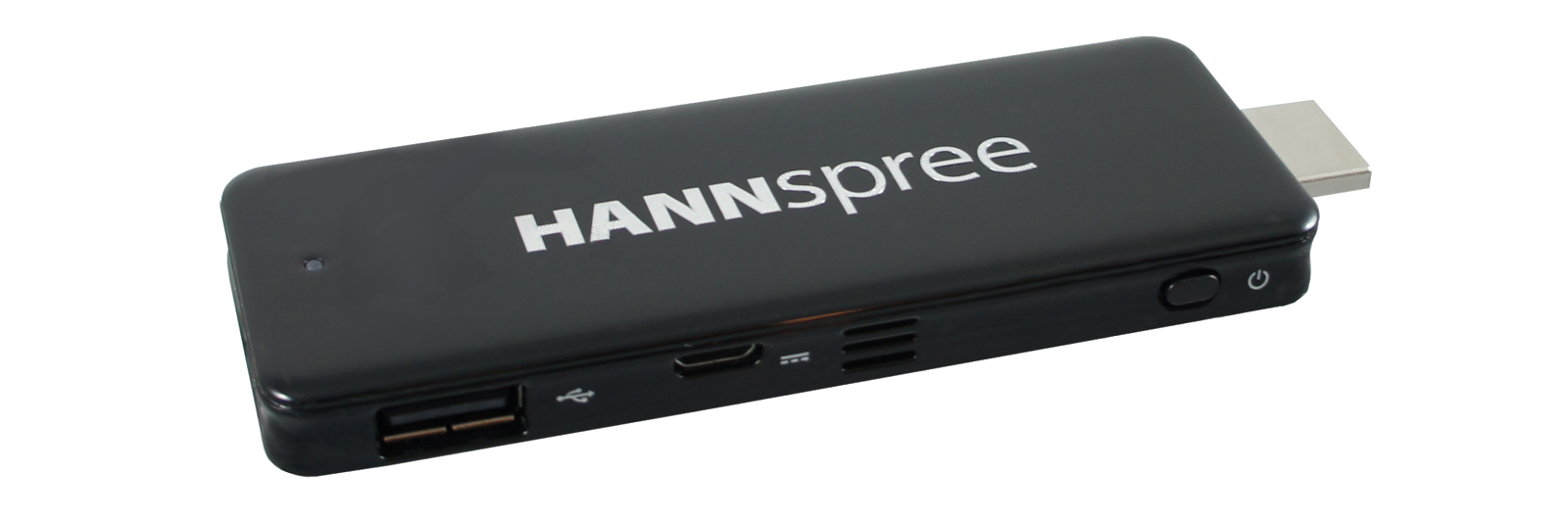
1.Hannspree 


To use, just plug Hannspree into the HDMI port in your monitor or TV screen, and you can use it as your personal computer. (Price: $177)

The Specs

  • Processor: Intel Atom Z3735F quad-core
  • Memory: 4 GB
  • Space: 32 GB eMMC
  • Operating System: Windows 8.1 (preinstaled)
  • Dimensions: 110.9 mm x 38 mm x 9.8 mm
 2.Intel® Compute Stick
The Intel Computer Stick transforms your TV into a full computer. It uses a Quad Core processor from the Intel® Atom™ series. You can choose whether Windows 8 OS or Ubuntu 14.04. Windows has 2 GB RAM and 32 GB of on-board storage while the Ubuntu Linux version only has 1 GB of RAM and 8 GB of storage. Need more storage? Use the microSD card slot to get more.(Price: $149 for Windows; $110 for Linux)

The Specs

  • Processor & RAM: Intel® Atom™ Processor Z3735F
  • Memory: 2 GB (Windows) and 1 GB (Ubuntu)
  • Space: 32 GB eMMC
  • Operating System: Windows 8.1 with Bing & Ubuntu 14.04 LTS
  • Dimensions: 103 mm x 37 mm x 12 mm
3.Asus VivoMini UN62
VivoMini UN62 is equipped with Intel Core i3 or i5 with RAM of up to 16 GB. It also requires low power consumption and is pretty quiet enough, releasing only 26.3dB at full load; that’s 60% quieter than the average computer in the market. Its integration with SonicMaster Technology offers good sound quality and it can output 4K/UHD quality images to your screen.Best of all, it can run on a power supply of only 6.95 Watts and it comes with fast-charging technology. (Price: $318.27)

The Specs

  • Processor: 4th Gen Intel® Core™ processors (Core i3 and i5)
  • Memory: 4 GB Up to 16 GB
  • Space: 32 GB Up to 256 GB mSATA SSD
  • Operating System: Windows 8.1 Pro
  • Dimensions: 131mm x 131mm x 42mm
 4.Cloudsto X86 Nano Mini PC
Here’s a flat mini PC that can fit in the back pocket of your jeans. This mini computer from Cloudsto comes with two variety, one running Windows 8.1 and another version running Ubuntu 14.04. Don’t let the size fool you, it features 3 USB ports, Micro SD card slot and a 3.5mm headphone output. This mini computer runs on Intel Atom Z3735F Bay Trail processor with 2 GB of RAM.The available storage is 32 GB, but is extendible with microSD. Cloudsto has a built-in 3000 mAh battery which you can even use to charge your smartphone. (Price: €129.99)

The Specs

  • Processor: Intel Atom Z3735F Quad-core
  • Memory: 2 GB
  • Space: 32 GB
  • Operating System: Windows 8.1 and Ubuntu 14.04
  • Dimensions: 148mm x 79mm x 9mm
 5.MSI CUBI
MSI Cubi computers are sold as "barebones" computers, which means you have to add the memory, storage, and operating systems yourself. Another way of looking at it is that you get to build your own computer and fit it with the specs you want. You can add between 2 GB and 16 GB of memory and install an additional 2.5" HDD for a bigger storage capacity. For the CPU, you can choose from:
  • Intel® Celeron™ 3205U
  • Intel® Pentium™ 3805U
  • Intel® Core i3™ 5005U
  • Intel® Core i5™ 5200U 
It is a real quiet computer (the noise is only about 20.1 dB) and it consumes less than 30 Watts of power. (Price: from $168)

The Specs

  • Processor: Celeron, Pentium, or Core i3
  • Memory: 2 GB – 16 GB
  • Space: 2.5″ HDD/SSD
  • Operating System: Windows 8.1/7
  • Dimensions: 115mm x 111mm x 35mm